Early PreviewJoin us on the road to v1.0 — help shape the future of specification engineering.Get Involved
SPECLAN mascotSPECLAN
SPECLAN

Your Specification Is Your Prompt

The missing middle layer between business intent and AI coding agents.

STRUCTURETRACEABILITYAI-READYGIT-NATIVENO LOCK-INSHIP

SPECLAN turns loose ideas into layered, traceable specifications — right inside VS Code. Git-native. AI-powered. Built for developers who ship.

id: F-1234
title: User Authentication
status: approved
parent: G-001
 Description
Implement OAuth 2.0 authentication
with SSO support for enterprise...

Workflow

From Idea to Spec to Code in Four Steps

SPECLAN gives you a repeatable path from a rough idea to a production-ready specification — with AI doing the heavy lifting.

1

Capture the Idea

Start with a business goal or a napkin sketch. SPECLAN creates a structured Goal entity and stores it as a Markdown file in your repo.

2

Break It Down

Decompose goals into features, nest sub-features to any depth, and attach detailed requirements. AI agents suggest the next level of detail.

3

Validate and Refine

Review specs in a WYSIWYG editor, run traceability checks, and move entities through a status lifecycle — from draft to approved.

4

Generate and Ship

Hand specs to an AI coding assistant that finally knows what to build. Or export for downstream tools.

See It in Action

Watch SPECLAN in Action

A quick walkthrough of how SPECLAN turns ideas into structured, AI-ready specifications.

This video is hosted on YouTube. Playing it requires third-party cookies.

Capabilities

Why SPECLAN?

The missing middle layer between what you want built and the AI that builds it.

Layered Hierarchy

Structure specs from business goals through features and sub-features to detailed requirements. Every requirement traces back to a reason, every feature to a goal.

Git-Native Specs

Specifications live as Markdown files with YAML frontmatter — right next to your code. Branch, diff, and merge specs the same way you merge code.

AI-Powered Agents

AI agents powered by Claude, Google Gemini, or OpenAI generate, refine, and validate specifications on your behalf. Go from a one-liner to a full spec tree in minutes, not days. Three providers. Your choice. Zero lock-in.

VS Code Integration

Same file, same tool, two experiences: a Markdown text editor for developers and a WYSIWYG editor for everyone else. Plus tree views, status badges, and contextual actions — all inside VS Code.

Full Traceability

Trace any requirement back through its feature tree — sub-features, features, and business goals. Bidirectional links let you navigate the full chain. Know exactly why every line of code exists.

Status Lifecycle

Move specs from draft to review to approved to released. Once in development, specs are locked — change requests let you iterate without creating moving targets.

Change Requests

Need to update a spec that’s already in development or released? Create a formal change request. The change is tracked, reviewed, and merged in the next dev cycle.

MCP Integration

Expose your specifications to the AI ecosystem through 43 Model Context Protocol tools. Any AI assistant that supports MCP can read, create, and manage your specs natively.

Get Started

Two Ways In

Whether you have an existing codebase or a fresh idea, SPECLAN meets you where you are.

Already have code?

Infer specifications from your existing codebase. SPECLAN analyzes what you have built and creates a structured baseline — so you can finally document what exists before deciding what comes next.

Starting fresh?

Import your requirements doc and get a structured specification tree in minutes. AI agents decompose your document into goals, features, and requirements — ready for review.

Real Developer Workflows

Why Developers Love It

Built by developers, for developers. Here is what happens when your specs finally live where your code lives.

I handed my SPECLAN spec tree to my AI assistant and it generated the entire module. The spec was the prompt.

Solo founder shipping an MVP

Finally, my specs do not live in a wiki that nobody reads. They are in the repo, versioned, and reviewed in PRs like everything else.

Staff engineer at a Series B startup

I described a feature in one sentence and the AI agent came back with a full requirement tree. I just had to say yes or tweak.

Freelance developer between contracts

When QA asks "where is the spec for this?" I just point them to the repo. Full traceability from goal through features and sub-features to requirement — no detective work.

Tech lead tired of playing spec archaeologist

News

Latest from SPECLAN

Stay informed about product updates, feature releases, and community developments.

Release Notes

SPECLAN v0.9.9 — Draw the Diagram Right Inside the Spec

v0.9.9 lets you draw diagrams where they belong: inside the requirement they explain. Sketch an architecture, a flow, or a state machine with Excalidraw without leaving SPECLAN; it renders inline, edits in place, and is stored as an ordinary .excalidraw.png in your own Git repo — human-readable for your team, machine-readable for your AI agent. Viewing works out of the box; drawing needs the free Excalidraw extension by pomdtr installed alongside SPECLAN. Also in v0.9.9: the HLRD Import Assistant now lets you choose an umbrella feature or populate in place and keeps your source document as an artifact, and AI Chat gains @-mention entity links and text-selection focus.

Community

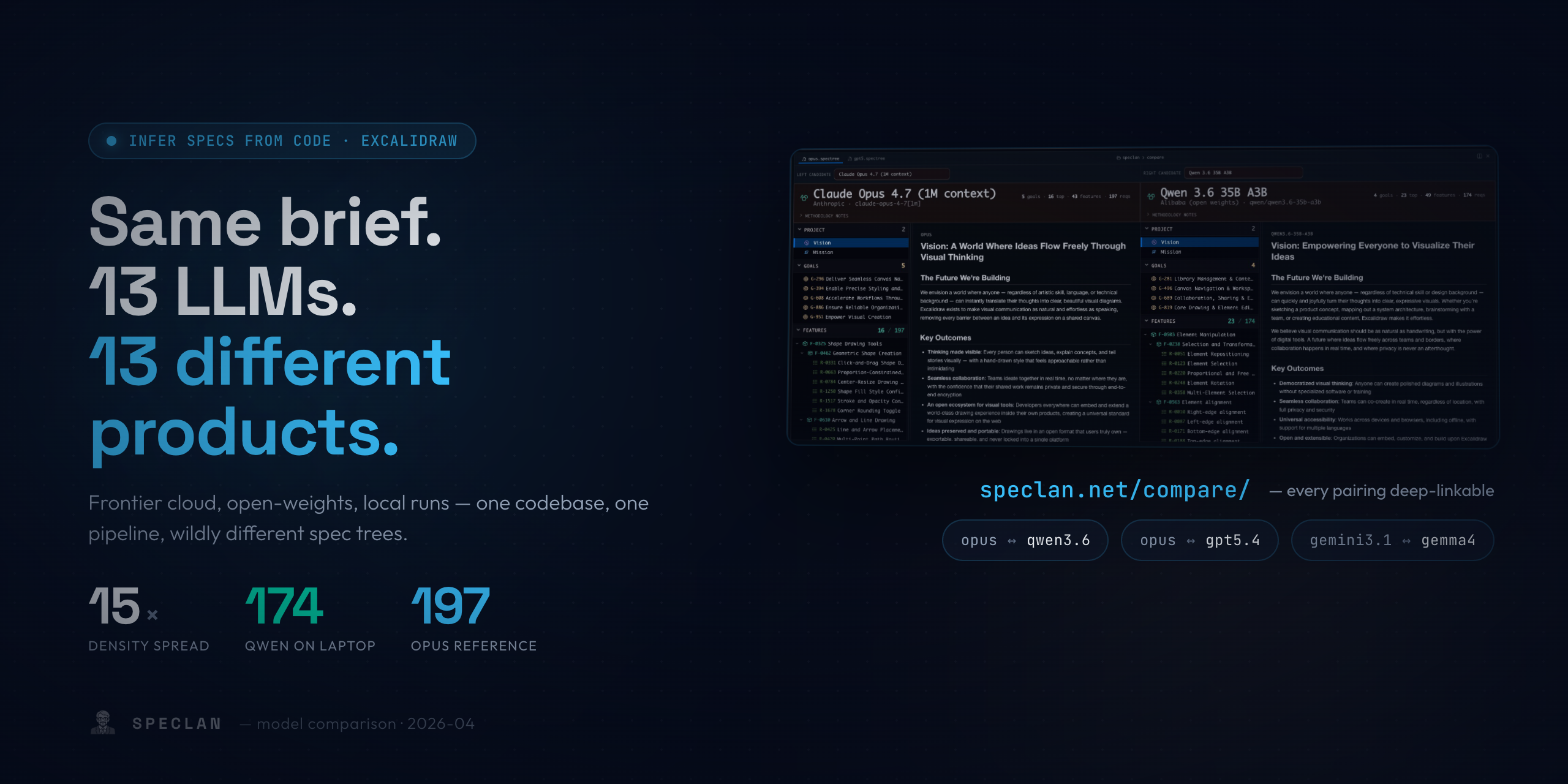
Which LLM Writes the Best Specifications? A Side-by-Side Across 13 Models

v0.9.6 let you point SPECLAN at any LLM you trust. The natural next question — which one should you actually use? — has no benchmark yet, because the literature stops at code. So we ran the same brief through 13 models on the same codebase (excalidraw), built a side-by-side viewer at speclan.net/compare, and let Claude Opus judge every other tree. The result is a 7-minute video and a gallery you can walk yourself: Anthropic's three sit at the top with Haiku 4.5 quietly out-counting Opus on requirements; Qwen 3.6 35B closes the cloud gap on a laptop; GPT-OSS 20B produces a coherent feature tree with zero goals; Gemma 4 26B leaves the literal string "Goal description goes here." in a Goal body; and Gemini Pro invents an account-billing system for a drawing tool. None of them are wrong — they're answering the same question with different products.

Release Notes

SPECLAN v0.9.8 — From an Idea to a Spec You'd Actually Implement

v0.9.8 turns SPECLAN from a place you store specifications into a place you write them. A new AI Assistant takes a one-line idea and forges a context-aware first draft for a Feature, Requirement, or Change Request — then two refinement tools sharpen it. Clarify finds the ambiguities and gaps in your draft and asks you targeted questions; your answers are worked back in. Brainstorm surfaces the angles you didn't think of and lets you pick which ones make it into the spec. The AI suggests; you decide what stays. Also in v0.9.8: a permanently visible Search Bar in the WYSIWYG editor for finding text fast within the open specification.

Blog

Latest from the Blog

Tutorials, best practices, and deep dives into specification-driven AI development.

By SPECLAN Team··AI

Same Brief. 13 LLMs. 13 Different Products. — A Practical Model-Picking Guide for SDD Teams

We ran SPECLAN's Infer Specs from Code pipeline against the excalidraw codebase with thirteen different LLMs — five frontier cloud models, two Google previews, and six open-weights locals. They produced spec trees that disagree about basic facts: how many features excalidraw has, which framing to use, whether Vision is worth writing down. Requirement density varied 15× on the same code and the same prompt. This is the honest reading of that comparison — what it tells you about picking a model for your own SDD workflow, and three caveats that matter more than any single row in the table.

By SPECLAN Team··AI

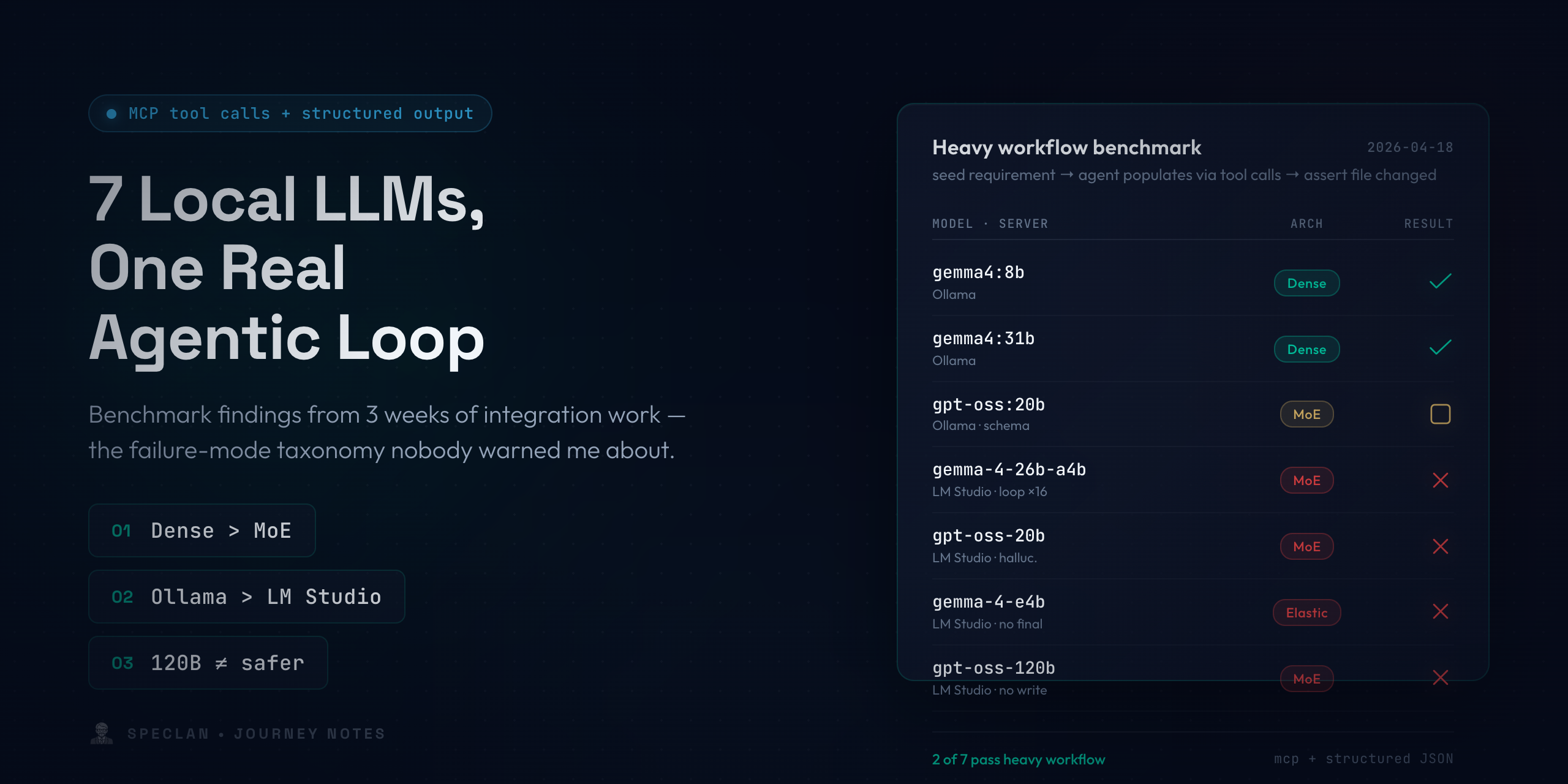
We Gave SPECLAN a Local Brain — And What It Changed About Using It

Running SPECLAN against a local LLM turns your spec tree into something that never leaves your machine. Here is what changes for a team when the model lives on the laptop, why it shifted how we use our own tool, and our April 2026 pick for spec generation: Qwen 3.6 35B A3B.

By SPECLAN Team··Workflow

Your PO Should Own the Spec, Not the Developer — Here's How

In most AI-assisted development workflows, the developer writes the prompt and owns the outcome. SPECLAN flips this: the Product Owner writes the spec, the status lifecycle controls who can do what, and the developer (human or AI) implements only what's been approved.

Community

Join the Community

SPECLAN is built in the open. Ask questions, share feedback, and connect with other developers who are rethinking how specifications work.

Join the Conversation

Ask questions, share your experience, and connect with other SPECLAN users. Whether you are just getting started or pushing the boundaries — the community is here to help.

Report a Bug

Found something broken? Post a bug report on the r/speclan subreddit. Include your version, OS, steps to reproduce, and what you expected to happen.

Links open in a new tab. A GitHub or Reddit account is required to post.

Get Started

Your AI Deserves Better Prompts

Go from scattered requirements to a structured, traceable specification in minutes. Install the extension and start shipping better specs.

Install in VS Code

or install via terminal

code --install-extension DigitalDividend.speclan-vscode-extension
TypeScriptGit-NativeAI-PoweredNo Database. No Server. Just Files.