
SPECLAN v0.9.7 — Specs Grow Attachments. Projects Grow a Reference Shelf.
v0.9.7 ships two artifact mechanisms — deliberately different — plus a one-click implementation-prompt button. Spec Artifacts attach evidence to a single feature, requirement, or change request with Change Request governance on locked specs. Project Artifacts give the whole project a shared reference shelf with no governance at all. Plus Quick Impl., the pill button that turns an approved spec into a paste-ready implementation prompt with a single click.
A specification is more than text. It comes with a wireframe, the regulatory PDF it answers to, the API contract it has to honour, the stakeholder slide deck someone negotiated against. Until v0.9.7, none of that lived in your spec tree. Now it does — git-tracked, status-aware, and split across two deliberately-different mechanisms.
That split is the design choice worth telling you about up front. Spec entities have status; project folders don't. The artifact mechanisms reflect that, and the rest follows naturally.
Watch the Tutorial
Prefer to see it in motion? Here's a hands-on walkthrough of Artifacts in SPECLAN — the same release notes, demonstrated end-to-end.
Spec Artifacts — Evidence Pinned to One Specification
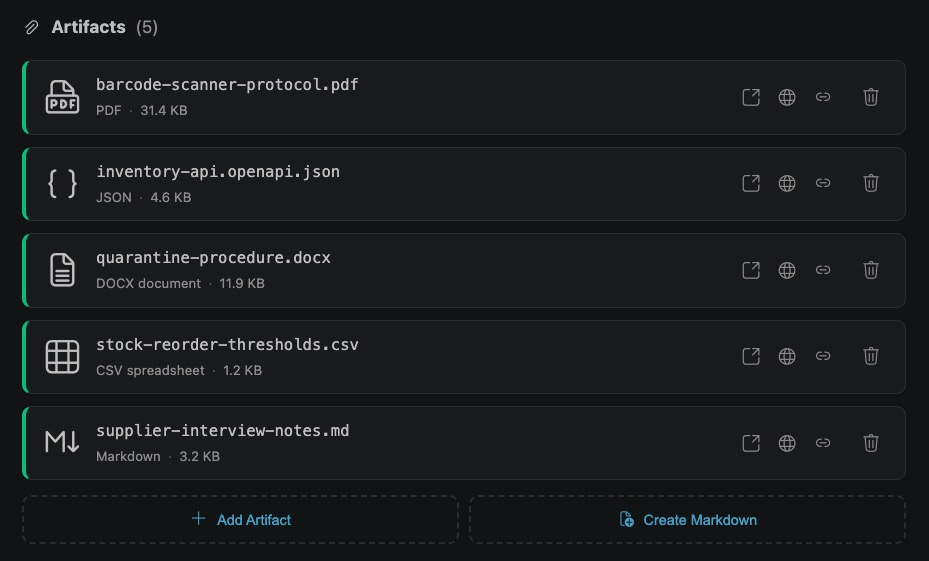
Every feature, requirement, and change request can now carry its own artifacts/ folder right next to its .md file. Drop in a wireframe; attach a contract excerpt; pin the stakeholder approval scan to the requirement it justifies. The file lives in git, travels with branches, and shows up in code review the same way a spec body change does.
In the WYSIWYG editor, an Artifacts section appears at the bottom of every spec page. Each attachment renders as a compact box: file name, type icon, type label, human-readable size. Click it and the artifact opens in a new VS Code tab using the registered default viewer — the image viewer for PNG/SVG, the PDF viewer for PDFs, your usual editor for JSON. Drag-and-drop works too.
The Real Discipline: Change Request Governance on Locked Specs
The interesting part isn't the file copy. It's what happens when the parent spec is locked.
A spec in draft, review, or approved accepts artifact additions and removals as direct file operations — quick, no ceremony. But the moment a spec reaches in-development, under-test, or released, the implementation team is building, testing, or shipping against the agreed evidence. Silent artifact changes at that point are how spec/implementation drift starts. The API contract you attached at approval is the contract the build was verified against; if it shifts without anyone noticing, the build no longer matches the evidence.
So in v0.9.7, on a locked spec, dropping in a new artifact doesn't overwrite the canonical file. Instead, SPECLAN automatically creates a Change Request in draft status, stages your file under a CR-suffixed disk name (<base>.CR-####-<slug>.<ext>), and surfaces a "Pending CR-####" badge in the Artifacts section. The Change Request flows through the standard draft → review → approved → in-development → under-test → released lifecycle. When you click Merge, the CR archives, the staged filename loses its CR suffix and becomes canonical, and the artifact section refreshes.
The same machinery handles removal. Deleting a wireframe from a released requirement creates a removal CR with its body pre-populated with <filename> was deleted — describe what implications this has on the specification. You fill in those implications before advancing the CR. A click becomes a documented decision — exactly the audit trail compliance reviewers actually want.
That CR isn't just a review record. Once approved, it's a signal into your implementation flow: the same lifecycle that releases a new mockup or a new contract tells the implementation it needs to update to match. Approve, hand off, the build catches up to the evidence.
Images Are Special — They Render Inside the Spec
One artifact class gets distinct treatment: images. PNG, JPEG, GIF, WebP, and SVG files attached to a spec can be embedded inline in the spec body through the WYSIWYG editor. Drop in a wireframe, click the image button in the toolbar, and the picture renders as part of the prose — illustrations next to a feature description, diagrams under an architecture section, mockups beside the requirement that drove them. No more linking out to a separate attachment row, no more "see Figure 3 below."
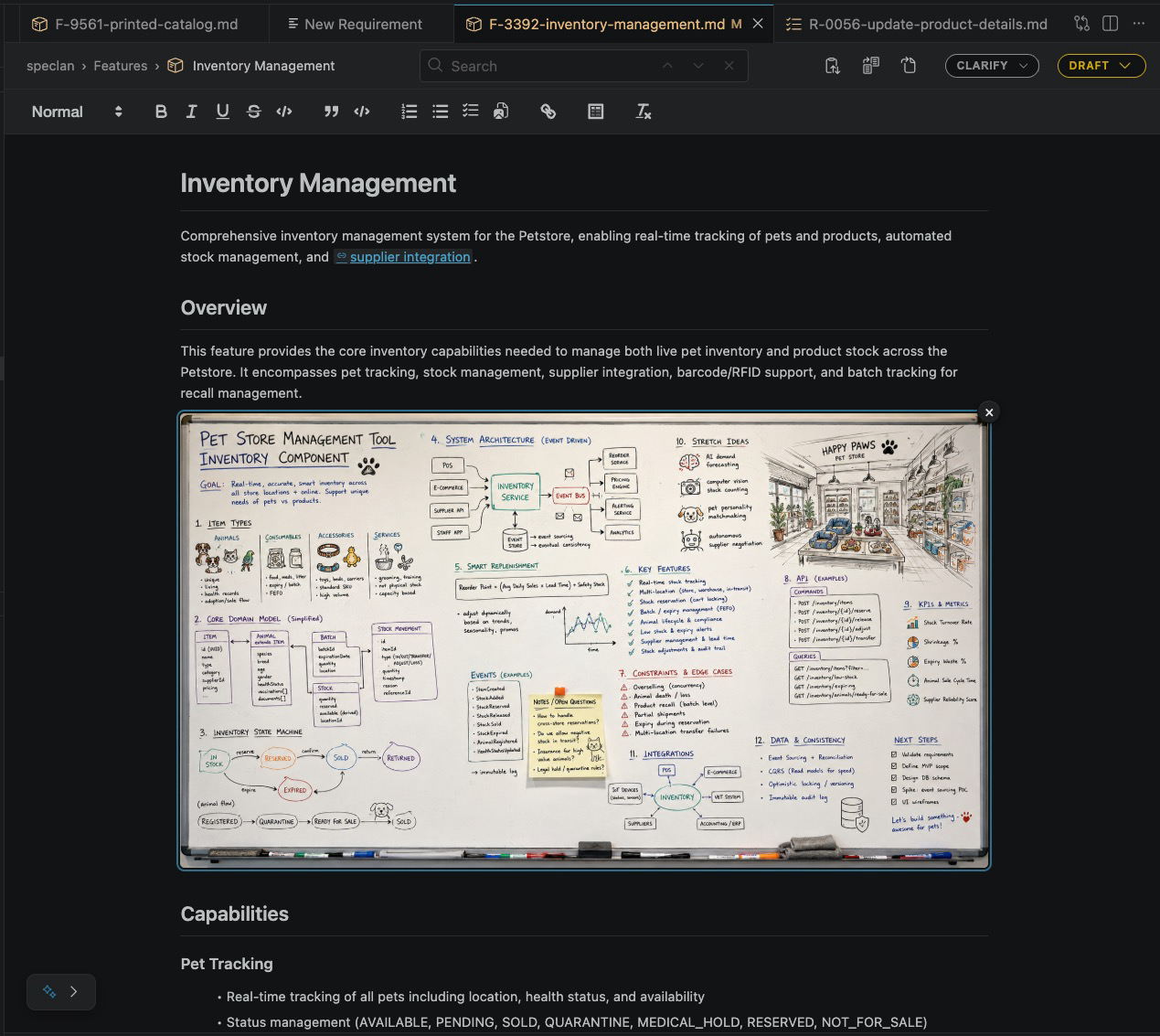
The on-disk artefact stays a plain  markdown link, so the spec is still portable to any markdown viewer — GitHub, plain editor, whatever. Switch to plain Markdown view in VS Code and you see the link above with the same image rendered below it. Rename an image artifact through the SPECLAN UI and the cascade keeps every inline embed pointing at the new filename.
Other artifact types (PDFs, spreadsheets, CSVs, archives) are referenced as plain markdown links — they don't render inline, but they're listed in the Artifacts section and one click opens them in the right viewer.
Project Artifacts — A Shared Reference Shelf
Not everything fits inside a single spec. Architecture diagrams, brand guidelines, regulatory PDFs, data dictionaries — these are reference material that many specs may consult and that no single spec owns. Forcing them through a Change Request workflow would be ceremony without reason.
So the second mechanism is speclan/artifacts/ — a single project-wide directory, surfaced as the third top-level entry of the PROJECT view in the SPECLAN sidebar, alongside Vision and Mission. Folders nest to any depth. Drop files in via the picker, drag from your OS file manager, or organize subfolders directly through the filesystem. No Change Request governance. Direct file ops always, regardless of any spec's status.
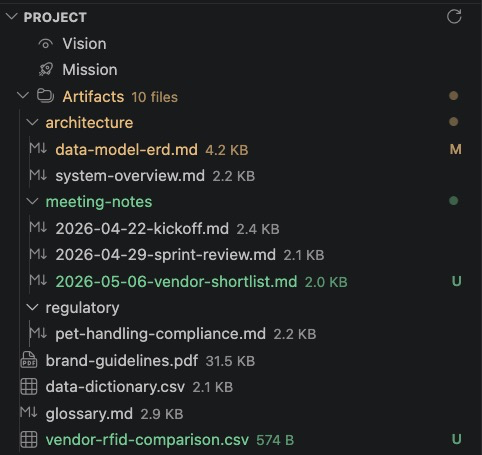
The PROJECT tree's third entry signals the structural completion of the question "what does this project know?" — Vision (where it's going), Mission (how it gets there), and now Artifacts (what reference material it keeps on hand).
Spec bodies can link to project artifacts via plain relative markdown — but the linkage is plain markdown, not a tracked relationship. The two surfaces share one thing: a consistent icon vocabulary. A .pdf artifact gets the same icon in the spec's Artifacts section as it does in the PROJECT tree. Different governance, same visual language.
What SPECLAN Does With Artifact Content (And What It Doesn't)
One thing worth being explicit about: SPECLAN does not read, parse, summarise, or interpret the bytes of your artifacts. It stores them, references them, governs their lifecycle through CRs, keeps inline image embeds in sync on rename. None of SPECLAN's AI features (Clarification, Infer Specs, CR Merge, HLRD Import) consume artifact contents.
What SPECLAN does is make sure the implementation agent — Claude Code, Codex, Cursor, or whatever assistant you hand the spec to — can find the artifacts and decide how to read them. Markdown, JSON, source code, and most images are read natively. PDFs, DOCX, PPTX usually need a skill attached to the agent or a pre-extraction step into a sibling Markdown artifact before the implementation hand-off.
This is deliberate. Bundling PDF/DOCX parsers into SPECLAN would lock you into one extraction pipeline and silently expose binary content to AI providers you may not have authorised for that scope. Artifacts are evidence the implementation agent can find — not pre-digested input the AI has already consumed.
Quick Impl. — One Click From Approved Spec to Paste-Ready Prompt
The third feature in v0.9.7 is the quality-of-life win: a pill-shaped button in the editor topbar, visible on Features, Requirements, and Change Requests, that turns an approved spec into a ready-to-paste implementation prompt with a single click.
Click Quick Impl. on an approved spec and SPECLAN copies a structured prompt to your clipboard, then shows a toast confirming the copy. The prompt instructs the receiving assistant to read the spec from its relative path, asks you which implementation technique you want before any code is written, sets the spec's status to in-development for the duration of the work, and bookends the lifecycle by flipping to under-test when development is complete.
This is the explicit alternative to SPECLAN's planfile-based implementation flow. If you have eight requirements and want a multi-step plan with checkboxes and resumability across sessions, the existing /speclan:plan-manual and /speclan:implement-manual skills are still there. Quick Impl. is the one-click hand-off for "I just wrote this one approved spec and want to ship it now."
The button stays visible in muted form on in-development and under-test specs, so if you accidentally overwrite your clipboard after the first copy, a second click puts the same prompt back. No state lost.
Curious Which Model Writes Specs You'd Trust to Carry Real Artifacts?
Once specs carry attachments and trigger implementation flows on approval, the quality of the spec the model authored matters even more. The model-comparison bench at speclan.net/compare — same brief, every spec tree side-by-side — is still the fastest way to calibrate before you configure.
Get the Update
If you already have SPECLAN installed from the VS Code Marketplace, v0.9.7 will update automatically. New to SPECLAN? Install the extension, open the sample project from the Welcome screen, and you'll see the Artifacts surfaces in their natural habitat.
For the full reference on how Spec Artifacts and Project Artifacts compose, when each governance path applies, and the rules around inline image embeds and filename sanitation, see the Artifacts help page.
Specs were always more than text. The data model finally agrees.