
SPECLAN v0.9.8 — From an Idea to a Spec You'd Actually Implement
v0.9.8 turns SPECLAN from a place you store specifications into a place you write them. A new AI Assistant takes a one-line idea and forges a context-aware first draft for a Feature, Requirement, or Change Request — then two refinement tools sharpen it. Clarify finds the ambiguities and gaps in your draft and asks you targeted questions; your answers are worked back in. Brainstorm surfaces the angles you didn't think of and lets you pick which ones make it into the spec. The AI suggests; you decide what stays. Also in v0.9.8: a permanently visible Search Bar in the WYSIWYG editor for finding text fast within the open specification.
SPECLAN v0.9.8 — From an Idea to a Spec You'd Actually Implement
For most of its life, SPECLAN has been very good at one half of the job: keeping your specifications structured, versioned, traceable, and honest about their status. The other half — actually getting the words onto the page — was still yours to grind through. You stared at an empty requirement file and tried to remember every section that should be there, every edge case you'd regret forgetting, every sibling spec you might be about to duplicate.
v0.9.8 is the release where SPECLAN starts helping with that half too.
There's now an AI Assistant that takes you from a single sentence of intent to a production-ready specification. It works for Features, Requirements, and Change Requests, it reads the surrounding spec tree so the draft fits where it's going to live, and — this is the part worth saying up front — it never decides anything for you. It drafts, it questions, it suggests. You decide what survives into the spec.
After v0.9.6 opened SPECLAN to any AI provider you trust, the obvious next question was: now that I can pick the model, what do I actually do with it? This is the answer.
Watch the Tutorial
Prefer to see it in motion before you read? Here's a hands-on walkthrough of the New Spec Assistant — idea to draft to a refined spec, end to end.
The Shape of the Flow
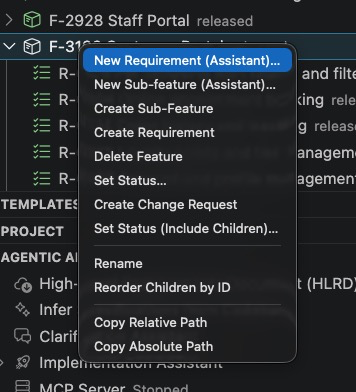
You start the assistant the way you start everything else in SPECLAN — from the spec tree. Right-click a feature and choose New Requirement (Assistant) or New Sub-feature (Assistant); the assistant opens already knowing the artifact type and the parent it belongs under, so you never re-enter what the tree already knows.
From there the journey is short and always under your control. Type an idea — one line is enough — pick the artifact type the calling context offers, and let the AI draft. A title and a template are optional; the AI proposes a title if you don't supply one. A context-budget pill tells you exactly what surrounding specification the AI will read before it writes, so the draft is connected to your project instead of generated in a vacuum.
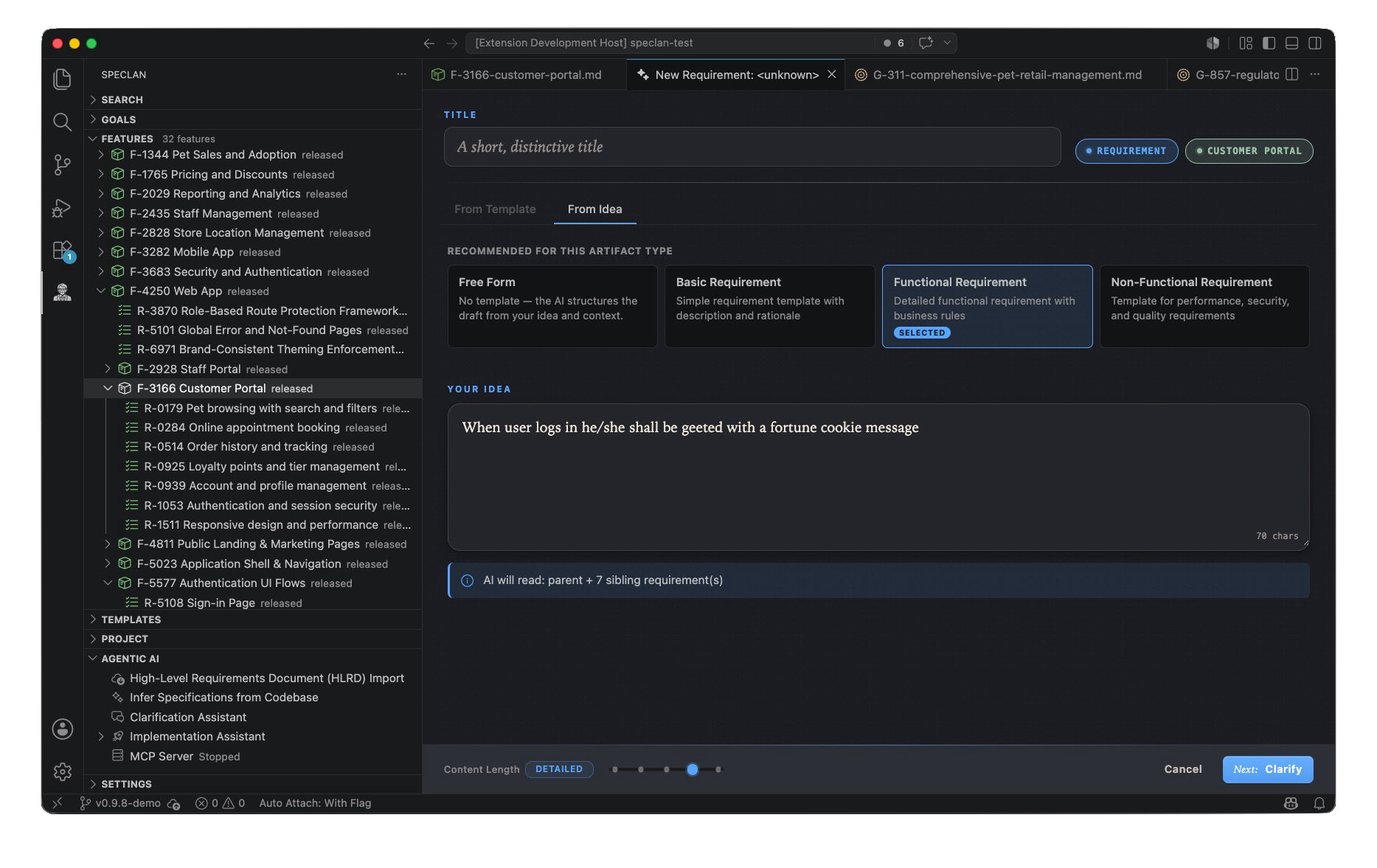
The two tabs matter. From Template always works — even with no AI configured at all, you get a structured blank scaffold from a template and a title. From Idea is the AI path, available whenever your provider is reachable. Same panel, same outcome shape, your choice each time.
The first draft is a real spec, not a stub: scoped sections, acceptance criteria, and validated relative links to related specs already in your project. Nothing is persisted until you press Create — the whole exploration is in-memory and disposable until you decide it's worth keeping. When you do create it, the spec lands in draft status, the very start of the normal review lifecycle.
The rest of this announcement is about the two tools that make the draft good, not just present: Clarify and Brainstorm. Each one solves a different failure mode of first drafts, so each gets its own section.
Clarify — Catch the Ambiguity Before It Becomes a Bug
A first draft is confident. That's the problem. The AI fills every section with plausible-sounding text, and the gaps don't announce themselves — they hide as assumptions that nobody questioned until an implementer hit them three weeks later and built the wrong thing.
Clarify is the tool that makes those gaps speak up. Run it on a draft and the AI reads the spec the way a skeptical reviewer would: it looks for ambiguous wording, underspecified behavior, missing scope boundaries, and decisions the draft quietly assumed instead of stating. Then it hands you a small set of targeted questions — multiple-choice when several answers can apply, single-choice when it's one decision, free-text when it needs your judgment. You can rate how much each question matters, and you can skip any question you can't answer yet. Nothing blocks you.
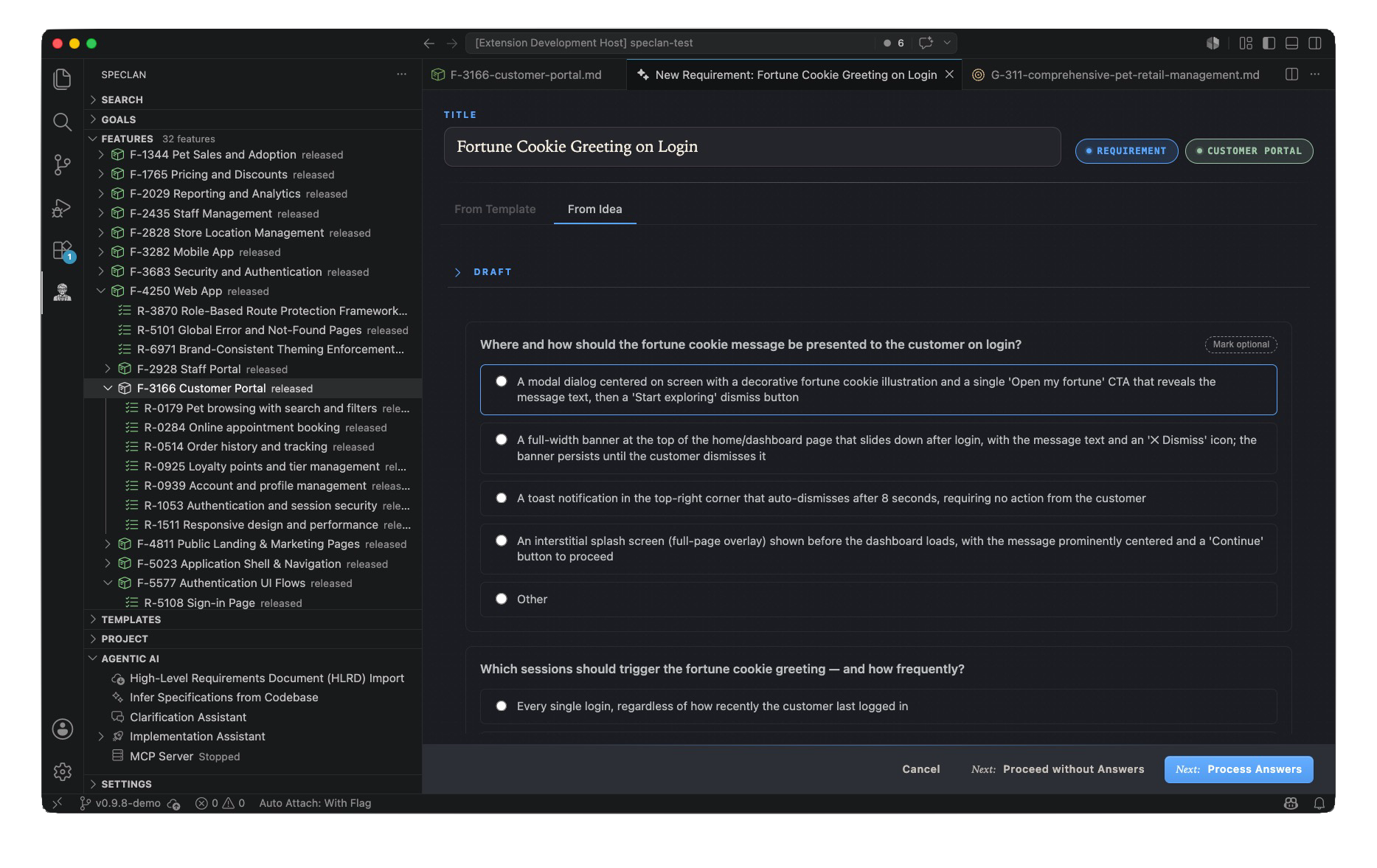
When you submit your answers, the AI doesn't just append them. It runs a refinement pass that works your answers back into the draft body, so you come back to a tighter, more precise specification — not a list of Q&A bolted onto the bottom.
Here's the effect in miniature. The draft requirement, before Clarify:
## Specification
When a user logs in, the system shall greet them with a fortune
cookie message.
The AI's questions surface the obvious holes: Where and how is the message shown — modal, banner, toast? Which sign-ins trigger it — every login, or the first of the day? What happens on a shared or service account? You answer the two that matter and skip the third. After Clarify:
## Specification
On a successful interactive sign-in, the system shall display a
fortune cookie message in a non-blocking banner at the top of the
landing page. The banner auto-dismisses after 8 seconds and can be
dismissed manually. The greeting is shown at most once per user per
calendar day; subsequent same-day logins do not repeat it. Service
and automation accounts are excluded.
Same idea. A spec an implementer can actually build from without guessing.
Brainstorm — Find the Angles You Didn't Think Of
Clarify makes a draft correct. Brainstorm makes it complete.
The other failure mode of a first draft isn't that it's wrong — it's that it's narrow. You wrote down the version of the feature that was in your head, and the things a good reviewer would have raised never made it onto the page because review hasn't happened yet — including the ways the new spec quietly contradicts the specs already around it.
Brainstorm brings that review forward. From your idea and the surrounding spec context, the AI generates a set of candidate directions — scope options, related requirements, edge cases, and inconsistencies with sibling specs you may have missed. You react to each one, accept the ones that belong, and reject the ones that don't. The ideas you accept get worked into the draft; the ones you reject are gone. You are the filter — Brainstorm widens the option space, it doesn't widen your scope without consent.
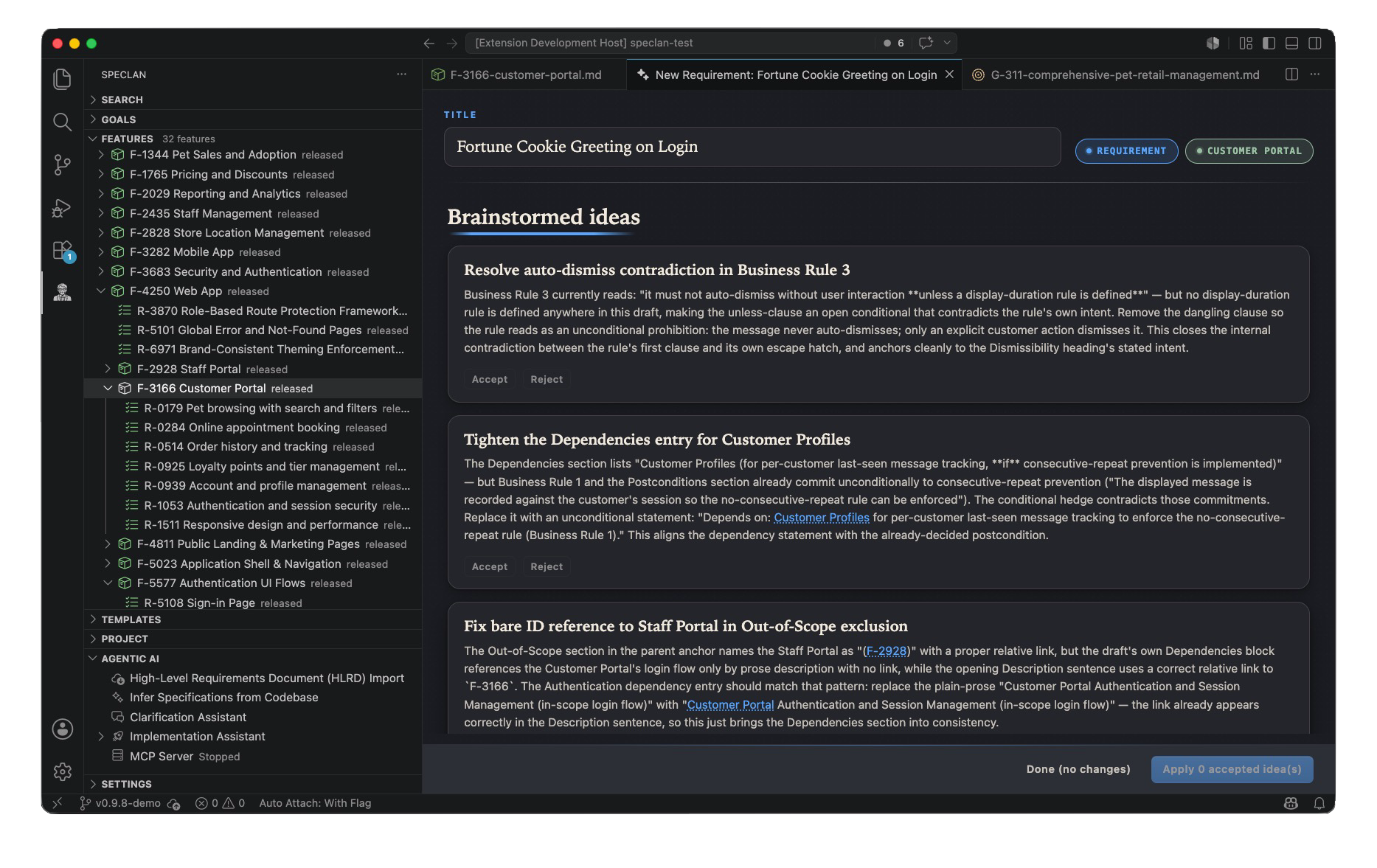
What's notable is what the AI raises. It isn't padding the spec with more features — it's catching that the draft's auto-dismiss timing contradicts an existing business rule, that a dependency reference points at a bare ID instead of a real link, and that an out-of-scope exclusion names a sibling spec ambiguously. Before Brainstorm, the draft was internally plausible but quietly inconsistent with its neighbours. You accept the contradiction fix and the dependency tightening, reject a suggestion that would have expanded scope, and the draft comes back consistent with the specs around it — with the rejected idea recorded as an explicit Out-of-Scope line so the next reader knows it was considered and deliberately excluded.
That last detail is the whole point. The difference between a spec that's complete and a spec that just looks finished is whether the things you decided not to do are written down on purpose.
You Stay in Control the Whole Way
It's worth being explicit, because AI authoring tools have earned some healthy suspicion: at no point does SPECLAN finalize a spec for you. Clarify asks; you answer or skip. Brainstorm offers; you accept or reject. The draft lives in memory until you press Create, and it lands in draft status — the very start of the review lifecycle, not the end of it. Owners and stakeholders review it exactly as they always have.
The AI is a faster path to a better first draft. It is not a shortcut around the judgment that makes a specification worth writing down.
Also in v0.9.8: A Search Bar in the Editor
Not every improvement needs an AI. v0.9.8 also ships a plain, fast Search Bar in the WYSIWYG Markdown editor — the feature you reach for the moment a specification grows past one screen.
It sits permanently between the breadcrumb and the editor's mini-actions toolbar, spanning the full width, never hidden or toggled. Type into it and every match in the open document is highlighted as you type, with the active match visually distinct and a counter showing where you are ("3 of 12"). Next and previous walk through the matches and wrap around at the ends. A keyboard shortcut focuses it without reaching for the mouse; another clears the session, drops every highlight, and scrolls you back to the top so you always return to a known position. Search is case-insensitive and matches your query as one continuous string — "fortune cookie" finds the phrase, not every stray "fortune" and "cookie" — and it deliberately ignores the hidden YAML frontmatter so you're only ever searching the spec you can see.
It's a small thing that stops being small the first time you're hunting for one acceptance criterion buried in a long requirement. No configuration, nothing to enable — open any spec and it's there.
Get the Update
If you already have SPECLAN installed from the VS Code Marketplace, v0.9.8 will update automatically. New to SPECLAN? Install the extension, open the sample project from the Welcome screen, right-click a feature, and choose New Requirement (Assistant) — you'll be from idea to draft before you've finished deciding what to call it.
For the full reference on the AI Assistant, the Clarify and Brainstorm tools, and how the two creation paths converge, see the documentation at speclan.net.
Your specification was always your prompt. Now SPECLAN helps you write it.